...

Burndown Charts in Agile: Complete Guide for Agile Teams

Table of Contents

Introduction 

Against the conventional project management metrics which is more of a target, agile metrics and reports are like a mirror of team patterns and antipatterns, which help them assess their performance and improve. Visibility and transparency are two main pillars of any agile framework.

Burndown charts operationalize these two pillars in a very practical way. While many Agile artifacts promise transparency, very few make progress (or the lack of it) impossible to ignore. A burndown chart does exactly that; it exposes delivery reality in its rawest form. It does not interpret, justify, or contextualize; it simply reflects. That is precisely why mature teams rely on it for honest self-inspection.

Despite its simplicity, the burndown chart is often misunderstood as a passive reporting tool. In reality, it is a behavior-shaping mechanism. Teams that actively engage with their burndown chart tend to demonstrate stronger execution discipline, faster issue escalation, and better intra-sprint collaboration. The chart does not improve performance by itself but the conversations around it do.

In this blog, we intend to explore and learn:

  • What is a burndown chart and why use them?
  • Key elements of burndown chart
  • Types of burndown chart 
  • How to create a burndown chart?
  • Some best practices and pitfalls to avoid with burndown chart

What is a Burndown Chart?

A burndown chart simply is a visual representation of work remaining over time. It maps the work left against the sprint duration. Basically it is an artifact which plots work against time to answer the golden questions:

  • How much progress have we made?
  • How much more work is remaining?
  • Are we on track to finish what we committed to?

What makes the burndown chart uniquely powerful is not the visualization itself, but the frequency at which it gets updated and interpreted. Unlike milestone-based tracking, which offers delayed feedback, burndown charts compress the feedback loop to a daily cadence. This enables teams to detect execution drift early, when corrective action is still inexpensive.

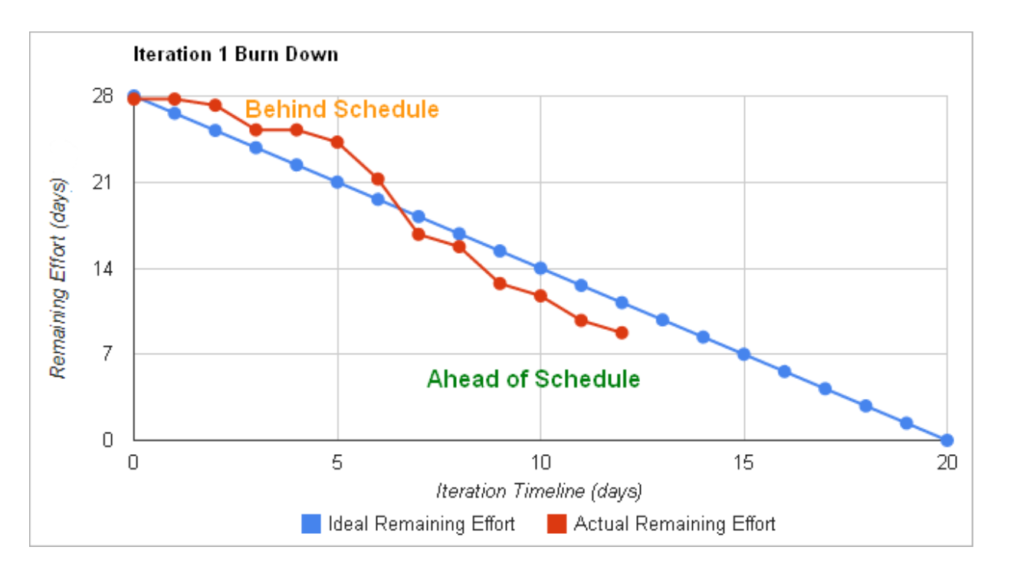
Layman Example: Imagine you have planned to read a 300 page book in 10 days. A burndown chart would plot total pages left after each day. If you finish 30 pages daily, your progress follows an ideal straight line down to zero. But if you skip reading one day or read extra, the actual line shows that deviation. 

This example highlights a subtle but important insight: consistency matters more than intensity. Teams often try to compensate for early delays with last-minute acceleration, but burndown charts make it visible that uneven progress introduces risk. Sustainable, incremental completion patterns almost always outperform sporadic bursts of activity.

image 2

Why Use a Burndown Chart?

The Burndown chart is not yet another graph. While it has been misunderstood widely as another report in agile, the value is beyond just visualization. One of the biggest shifts in high-performing teams is when they stop reading the burndown chart and start questioning it. Instead of asking “What does the chart say?”, they ask:

  • What behavior is this chart reflecting?
  • What system constraint is causing this pattern?
  • What decision do we need to make right now?

This shift transforms the chart from a reporting artifact into a decision-support tool.

It helps the teams with, 

  1. Transparency and Accountability – A burndown chart makes progress visible to everyone in the team. It acts as a single source of truth that shows what has been done and what is left. This helps teams take accountability for what they have committed for
  2. Surfaces warnings early – By showing real time progress of work, the burndown chart can alert the team on potential problems early in the sprint. For example, if your actual line is always above the ideal line, it may be a blocker in the team or maybe your story is too big 
  3. Forecasts effectively – Team’s burndown chart over time can become a valuable input for team’s forecasting. By looking at past few burndown charts, teams can get better at estimating, planning, splitting big stories into smaller once and improve predictability 

Over time, burndown charts contribute to building a team’s delivery intelligence. Patterns across multiple sprints reveal deeper insights such as estimation bias, dependency bottlenecks, and completion behavior. This longitudinal visibility is what enables teams to move from reactive execution to proactive planning.

Key elements of Burndown Chart

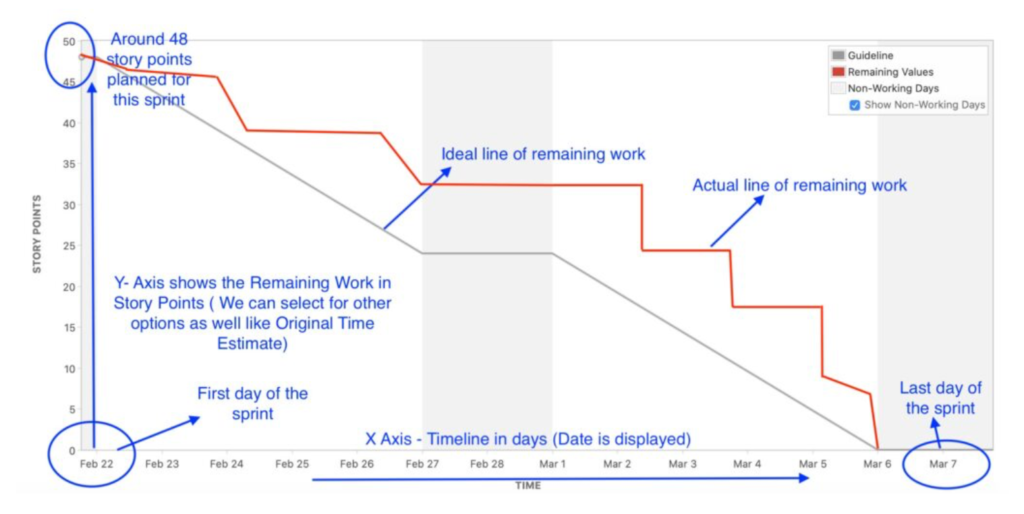
Let’s understand the key elements of a burndown chart with a sample as shown in the picture below. 

X-axis (Time): Sprint duration or project timeline

The horizontal axis or the x axis represents the time. For a sprint burndown chart, the x axis is the number of working days. In the below example it is 10 days ( 2 week sprint ). However, for a release burndown chart, the x axis represents sprints/weeks/months. It talks about the “when”, the duration over which the work is expected to be completed.

Y-axis (Work Remaining): Story points, tasks, or hours left

The vertical axis or the Y axis represents the total amount of work left to be done. This often is measured in story points. However, some teams use hours or even count of work items. It talks about “How Much”, the total amount of work you have committed.

image 3

Ideal Burndown Line: The planned progress trajectory

This is the straight line that goes from the top left corner of the chart to the bottom right. It represents the linear, ideal world scenario where the team completes an equal amount of work each day. It is your benchmark or baseline path to success. This ideal line is a reference point. It helps the teams to understand the deviation from the original plan. The ideal line is frequently misinterpreted as a performance expectation. It is a reference construct. Teams that treat it as a benchmark for daily comparison often create unnecessary pressure, while mature teams use it only to understand deviation patterns, not to enforce artificial alignment.

Actual Burndown Line: The real-time progress of work completion

This is the line that represents the team’s progress. It tracks the actual amount of work remaining at the end of each day. It is dynamic and is no way close to the ideal line. It might have dips as work gets completed and spikes as and when work is added to the sprint. This line tells the real story of your sprint, the challenges you faced, the success you achieved and the overall progress of your team. The idealistic understanding with the actual line is that:

  • If the actual line is above the ideal line, it means that the team is lagging behind
  • If the actual line is below the ideal line, it means that the team is ahead of what they were supposed to complete

The shape of the actual burndown line often reveals more about team dynamics than delivery itself. For example, a late steep drop typically indicates work being completed in batches rather than in flow, while frequent spikes may point to unstable scope or mid-sprint reprioritization. Interpreting these patterns correctly is where the real value lies.

Types of Burndown Charts

Burndown charts are usually used for predictability and transparency purposes. When it comes to the context, there are different types of burndown charts to represent different levels of predictability. For example, a sprint burndown chart gives predictability and transparency for a team at a sprint level. Let’s have a look at all the levels where burndown charts can be used.

Each type of burndown chart serves a different decision-making horizon. Sprint-level charts enable tactical adjustments, while release and epic-level charts support strategic alignment. Organizations that scale Agile effectively do not rely on a single chart, they create a layered visibility system where different stakeholders consume different levels of burndown insights.

image 7

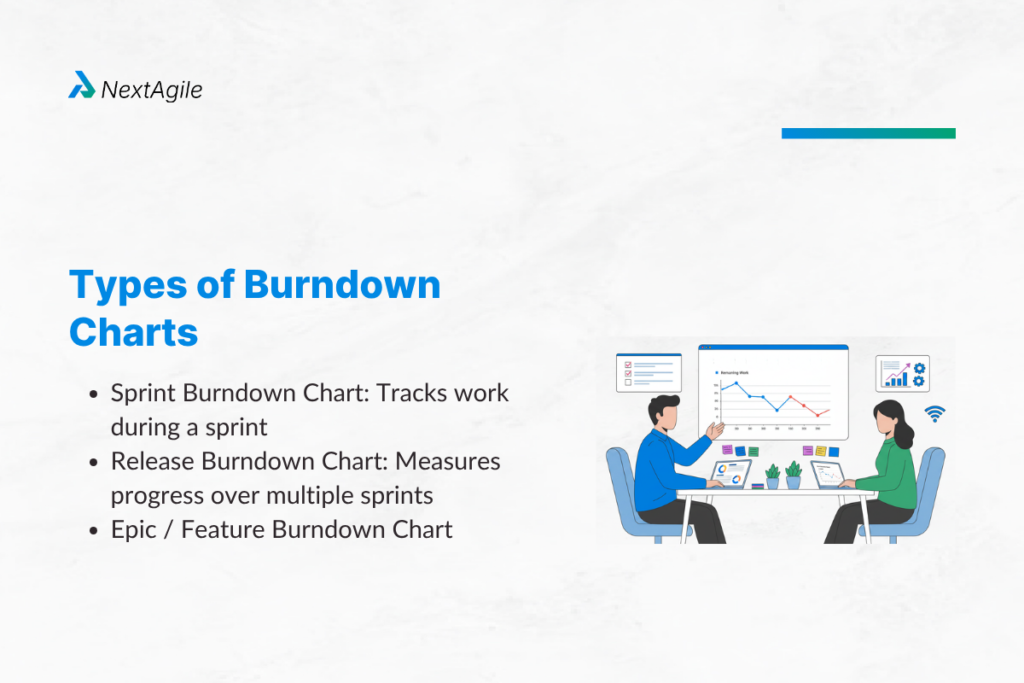
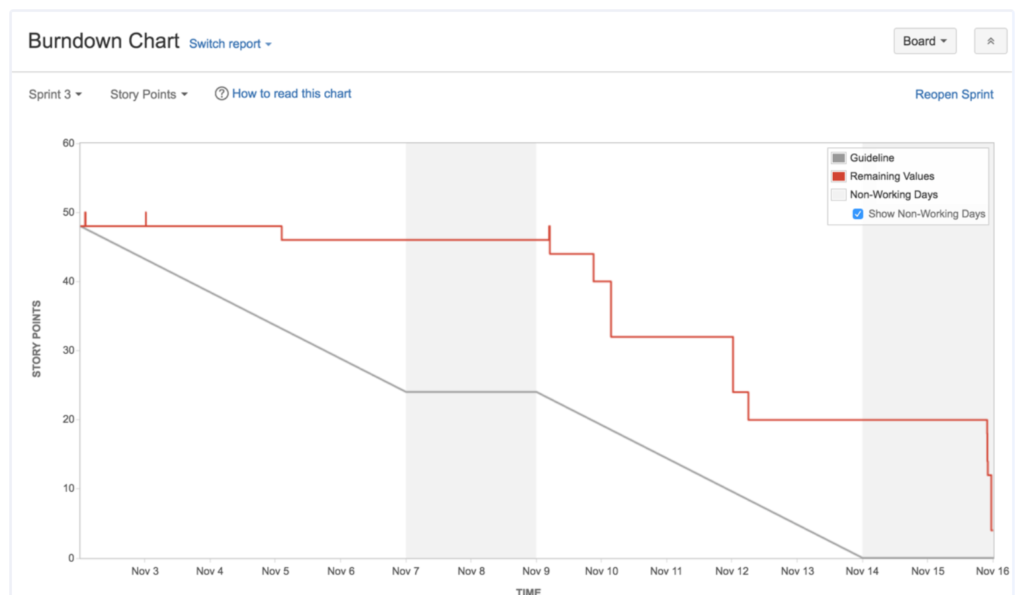
1. Sprint Burndown Chart: Tracks work during a sprint

  • Tracks progress within a single sprint 
  • Most commonly used in scrum ceremonies like daily stand ups 
  • Helps teams see daily progress and adjust mid sprint caveats 
image 4

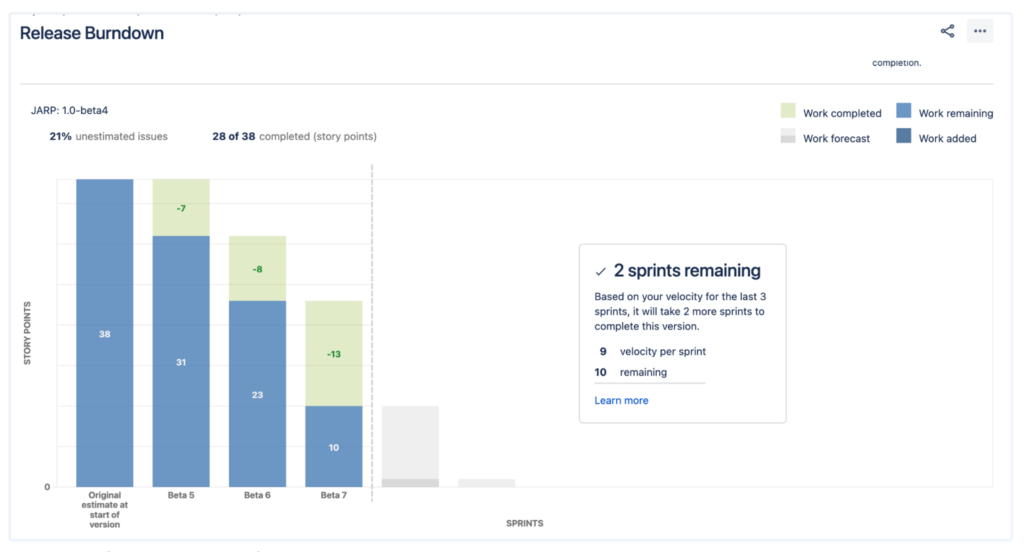
2. Release Burndown Chart: Measures progress over multiple sprints

  • This burndown chart is beyond a single sprint
  • Could be used across a release with multiple sprints 
  • Useful for product managers and stakeholders to see if a release goal is on track
image 5

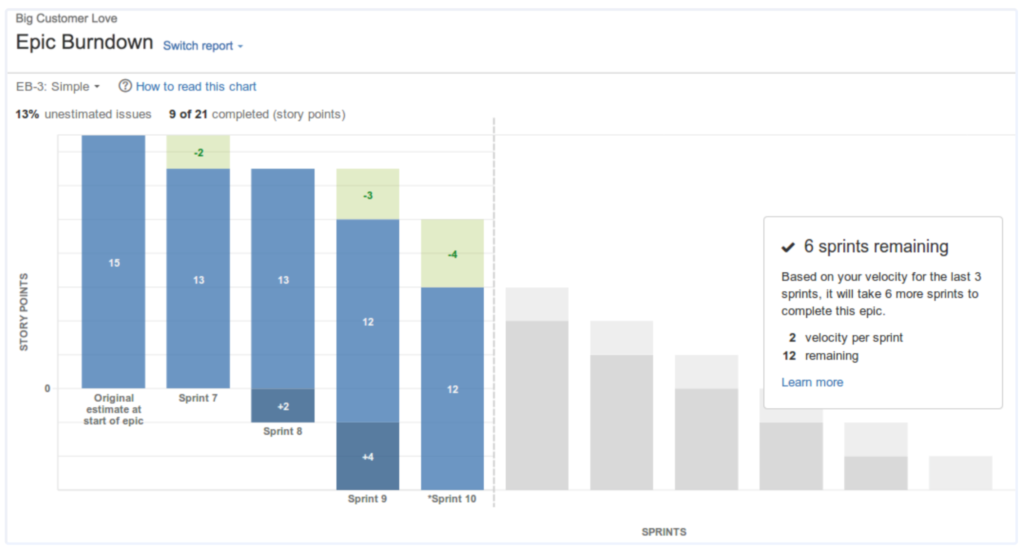
3. Epic / Feature Burndown Chart

  • Focussed on progress for a specific epic or large feature 
  • Helps teams visualize how a chunk of functionality evolves over time
  • Specifically useful when you have complex features spanning across multiple sprints and need to track their progress
  • It can also showcase the scope added across sprints for a large feature
image 6

How to Create a Burndown Chart?

Creating an effective burndown chart is not rocket science. Most of the agile project management tools come with an inbuilt burndown chart feature. But let’s look at the steps involved in creating a burndown chart.

  • Step 1 –  Define your sprint/project goal 
    • Without a well defined scope, your burndown chart becomes meaningless
    • Clarify what the team is committing to whether it is delivering 50 story points or completing an epic
  • Step 2 – Estimate work using story points, tasks, or hours
    •  Depending on your team’s dynamics, decide whether to use story points, task count or hours
  • Step 3 – Plot data using Agile tools (Jira, Trello, Excel, Azure DevOps)
    • Once your sprint planning is complete, choose the right tool. Tools like Jira, Trello, Azure DevOps auto generate the burndown charts
    • The most important thing is that your team updates the work item statuses regularly 
    • While tools automate chart creation, they cannot guarantee data integrity. The accuracy of a burndown chart is directly proportional to the discipline of the team in maintaining work item states. Inconsistent updates, delayed closures, or partial tracking can quickly turn a burndown chart into a misleading artifact.
  • Step 4 – Track progress daily and update the chart
    • This is where many teams fail. They create the chart but forget to maintain it
    • Showcase your burndown chart everyday in the daily stand up meeting 
    • Ask the question how much work is left?
  • Step 5 – Analyze trends and take corrective actions
    • A burndown chart is only as good as the insights you derive from it
    • Look at the patterns, identify the blockers early and adjust your actions accordingly
    • For example, if your actual line is a straight line till the last day of the sprint and the pattern continues across sprints, it could mean that the stories are too big to be completed in a sprint or that the team is blocked from an external teams or even that the team is not updating the tickets
    • Many teams stop at observation and fail to act. The real effectiveness of a burndown chart lies in how quickly it triggers intervention. A flat line should lead to immediate questioning, not end-of-sprint analysis. The shorter the gap between signal and action, the higher the team’s execution maturity.

Common Pitfalls and How to Avoid Them

Burndown charts are powerful, but the teams should understand that the data they enter is what is displayed by the chart. Here are a few pitfalls and how to avoid them. 

image 8

1. Underestimation or overestimation of work

  • If the story points or tasks are not estimated properly, the chart gives you a misleading insight rather than an informing insight 
  • Avoid this by refining the backlog regularly and by using historical velocity for guidance 

Estimation issues distort visibility. A poorly estimated backlog creates a false sense of progress or delay, making the burndown chart unreliable. This is why estimation refinement is not just a planning activity but a measurement accuracy activity.

2. Not updating the chart regularly 

  • As and when a work item is completed, there is a dip in the actual line. A stagnant chart often means tasks are not being closed daily
  • Avoid this by remind the team during the stand ups to update their boards or making updating the board mandatory before coming to the standup 

3. Ignoring external factors 

  • Dependencies, blockers or even scope creep can stop progress
  • The burndown chart will not tell you why the line is flat, it is up to the team to understand the context
  • Understand the context and solve the team’s problems which the chart is surfacing 

A burndown chart is intentionally silent on causation. It shows what is happening, not why. Teams that expect the chart to explain problems miss its purpose. The value lies in using it as a trigger to investigate deeper systemic issues such as dependencies, unclear requirements, or environmental constraints.

Best Practices for Using Burndown Charts Effectively

Using a burndown chart is not just an activity but a practice/habit. To get the most out of it, teams need to use it everyday. 

Burndown charts become truly effective only when they are embedded into team routines. When referenced consistently in daily stand-ups, sprint reviews, and retrospectives, they create a shared language of progress. Without this integration, they risk becoming another ignored dashboard.

1. Keep the backlog well-defined before starting a sprint

  • A burndown chart can only be accurate if the initial commitment is stable. 
  • A poorly defined backlog and constant scope change to the sprint will make the chart meaningless
  • Use your sprint refinement to ensure you have not more than 10% of scope changes

2. Regularly review progress in daily stand-ups

  • Make the burndown chart  mandatory in your daily stand ups
  • Review it with the entire team and discuss spikes or flat lines and talk about what has happened and how does it affect your sprint goal 

3. Use burndown charts alongside other Agile metrics

  • The burndown chart is not the only metric that matters
  • Use it with other metrics like velocity and lead time to get a holistic picture of your team’s/project performance

4. Focus on trends rather than day-to-day fluctuations

  • The actual burndown line will never be smooth
  • Do not worry too much on a single day’s lack of progress 
  • Look at the overall trend over several days and sprints and then take an informed decision to solve the problems

Short-term fluctuations are natural in knowledge work. What matters is directional consistency. Teams that overreact to daily variations often introduce unnecessary changes, while those that observe multi-day trends make more stable and informed decisions. The burndown chart rewards patience paired with awareness.

Conclusion

A useful mental model is to think of the burndown chart as a lagging indicator of execution and a leading indicator of risk. It reflects what has already happened, but more importantly, it signals what is likely to happen if the current pattern continues. Teams that internalize this dual role use the chart far more effectively than those who treat it as a historical report.

A burndown chart may look like a simple line graph but it is a powerful reporting artifact that brings clarity, transparency and predictability to your teams. It’s real power is in the conversations it triggers and alignment it brings. Whether you are tracking a two week sprint, a product release or a big feature, the chart helps teams visualise progress, spot risks early and stay on track.

As an agile consulting company, we always maintain that a burndown chart is not just for the managers or scrum masters, it is for the entire team. By understanding its key elements, avoiding common pitfalls, Organizations can ensure that their teams derive maximum insights about their performance. Start simple, maintain the discipline of regular updates and learn from your patterns that your chart tells you. 

With this, our blog on “A Quick Guide to Burndown Chart” comes to an end and we sincerely hope that it has helped our readers. Please write to us at consult@nextagile.ai for any feedback or suggestions.

Frequently Asked Questions

1. Can a burndown chart be used in Kanban?

Yes, a burndown chart can be effectively used in Kanban. While it is not a standard component like in scrum where there is a defined number of days against a certain amount of work planned, Kanban focussed on flow of work and still can be used to track progress of certain epics or releases.

2. Why does my burndown chart show a flat line?

The flat actual line in a burndown chart means that there is no work completed. Some of the very common reasons include, 
Work items being big and not being able to finish in a sprint 
Teams blocked by a dependent 
Team members not updating their work items 

3. How does a burndown chart help in sprint retrospectives?

A burndown chart brings in the visual summary of the sprint’s performance. The team can analyze the actual line to identify patterns like regular blockers, sudden spikes, challenges that came through and etc that helps teams make more data driven decisions rather than emotional ones.
While burndown charts are widely adopted, their effectiveness varies significantly based on how teams interpret and act on them. The difference lies in mindset. Teams that use burndown charts to drive conversations consistently outperform those that use them merely to report status.

Talk to Our Experts

Get expert guidance within 1 business day.

expert-advice

Expert Advice

lightning

Fast Response

100% Confidential

100% Confidential


No spam. Your information stays private

call

Prefer a call?

Schedule a call with our expert after submission

Recent Posts