Skip to content



Introduction
How to calculate WIP limits in Kanban is essential knowledge for any agile team. One of the very common anti-patterns we have seen in our engagements as an agile consulting and coaching company, is that team members pull a work item, and without finishing that (for several reasons), they start working on a new work item and this causes burn out in the teams and work not getting completed. Also, when the team members do not focus on finishing work, it may lead to delays, reduced quality and stress within the team. WIP limits in Kanban ensure this does not happen and the flow of work is continuous and smooth. So let’s understand that in detail. This blog aims at exploring:
- What is Kanban and its principles?
- A sample Kanban board with a workflow
- How to set WIP limits for Kanban boards?
What is Kanban?
Kanban is an agile framework that helps teams to visualize work, maximize efficiency, and improve continuously. It helps you to represent the work on Kanban boards, allowing the teams to optimize work delivery.
- Kanban has following principles
- Visualize the workflow
- Limit work in progress: explicitly limit work items, defects, features in each stage of the workflow
- Optimize the flow of work
- Make policies explicit
- Implement feedback loops
- Improve collaboratively
- Scenarios where Kanban Flow management is applicable
- Routine unplanned work or ad hoc work
- Lot of incoming frequent requests with varied priority and severity scales
Kanban Boards Workflow
Below is the sample of a Kanban board that helps visualize work across the workflow. In this example, we have taken an engineering team whose work flows across To Do > In Dev > Unit Testing > Code Review > Ready for QA > In QA > Ready for PO > Done.
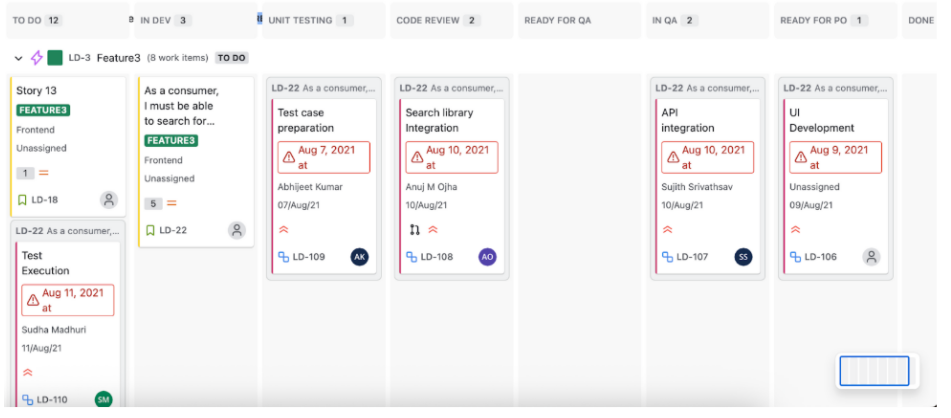
Guidelines for a Kanban Board
Below is the step by step guide for any team to set up a kanban board for their team:
- Identify the stages involved in completion of work like “To Do”, “Development in work being performed by the team
- Create columns that map to the workflow – “To Do”, “Development in progress”, “Code
- Review”,” QA Ready”, “QA in Progress”, “Done”
- Set WIP Limits for each of the columns
- Identify the items to be worked upon – “To do” list
- Spot process bottlenecks on a Kanban board
- Create a swim-lane for expedite items
- Continuously monitor the flow and make changes
What are WIP Limits in Kanban?
WIP limits is one the key principles in kanban that sets a maximum number of tasks that can be in progress at any point in time in each step of the workflow. This helps the teams to finish the current work before starting the next task. Also surfaces up any bottlenecks in the workflow and prevents overloading the team members. When there is a WIP limit set to a stage, it means that no more work items can be pulled into the stage before clearing the current work.
Example: If WIP limit for In Dev column is 3, and there are already 3 work items in the column, teams need to help each other in completing at least one of the 3 work items before pulling a new one.
How to calculate WIP limits in Kanban?
Let’s take an example of the following board for a team who is trying to set WIP limits for their columns. The workflow taken in this example is To Do > In Dev > Unit Testing > Code Review > Ready for QA > In QA > Ready for PO > Done.
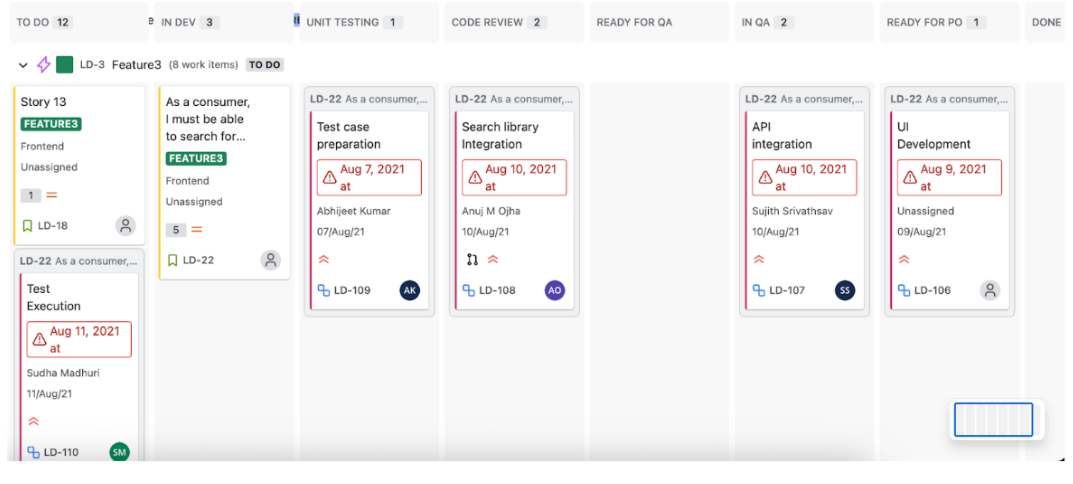
- Step 1: Identify Value Adding (VA) and Non Value Adding (NVA) activities/ columns
- Example VA columns: In Dev, Unit Testing, Code Review, In QA
- Example NVA columns: Ready for QA, Ready to PO
- Step 2: Identify Process Efficiency Percentage (PEP)
- Formula: PEP = VA Time/ (VA Time + NVA Time)
- Example: VA time assuming 8 days and NVA time assuming 2 days
- PEP = 8/(8+2) = 0.8 i.e. 80%
- Step 3: Identify Task on Board (ToB) per queue i.e. number of tickets we can have on the board at the same time
- Formula: ToB = Team Size/ PEP
- Example: assuming our team size in 4 people
- ToB = 4/0.8 = 5
- Step 4: Calculate WIP limit for VA columns
- Formula:
- VA Time Percentage = Time for respective VA column/ Total VA time
- WIP Limit = VA Time Percentage * ToB
- Example: original assumption VA time is 8 days, assuming In DEV time is 2 days
- VA Time Percentage for In DEV column = 2/8 = 0.25 i.e. 25%
- WIP Limit for In DEV column = 0.25*5 = 1.25 = ~1 task
- Similarly the steps can be replicated for other VA columns
- Formula:
- Step 5: WIP limit for NVA columns is always 0